I followed the instructions you provided, but this is what happens—I’m unable to save or download anything. It just gets completely stuck. Even after pressing the save button, the only options available are to delete or cancel.

13 replies · last update

I followed the instructions you provided, but this is what happens—I’m unable to save or download anything. It just gets completely stuck. Even after pressing the save button, the only options available are to delete or cancel.

SMReplying to Shinichi Moriyama·I followed the instructions you provided, but this is what happens—I’m unable to save or download anything. It just gets completely stuck. Even after pressing the save button, the only options available are to delete or cancel.
Thanks for trying again, and sorry it’s this fiddly. On the screen with only Delete and Cancel, look just above those buttons for a small Show more (詳細表示) link with a little arrow. Click it, and a Keep anyway (保持する) button appears below. Click that, and the file is saved.
If there’s no Show more link, the easiest way around it is to download the file with Chrome or Firefox from traces.dg-edge.com/download. They don’t block it the same way. When you open the file, if Windows says “Windows protected your PC”, click More info, then Run anyway.
If it still won’t work, post a screenshot in the Traces forum at traces.dg-edge.com/community and I’ll help you from there.
i just can't download yet.
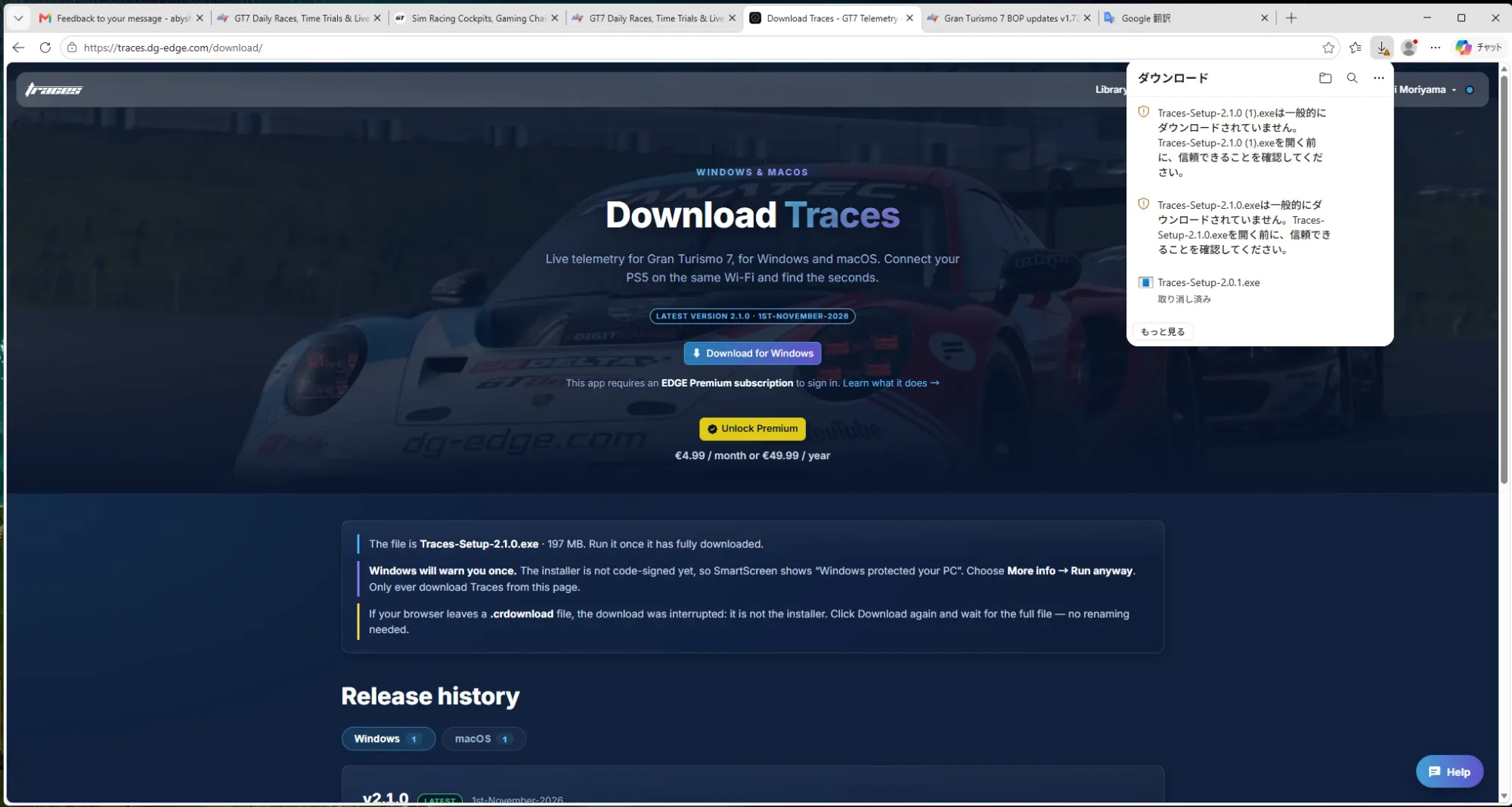
Hi! Thanks for trying Traces. The Windows installer isn’t code-signed yet, so Windows and some browsers are cautious with it. Here’s how to get it running:
Check the browser’s downloads list (Ctrl+J). Chrome or Edge may have held the file back with a message like “isn’t commonly downloaded” or “couldn’t be verified”. Click the three dots next to it and choose Keep, then Keep anyway.
Make sure the whole file arrived. The installer is called Traces-Setup-2.0.1.exe and is about 195 MB. If you only see a file ending in .crdownload, the download was cut off and that file isn’t the installer. Download it again from traces.dg-edge.com/download and wait for it to finish. No renaming needed.
When you open it, Windows may show a blue “Windows protected your PC” window. Click More info, then Run anyway.
If the file disappears after downloading, your antivirus may have quarantined it. Check its quarantine or protection history, restore the file, and allow it.
Traces runs on Windows and macOS. If you’re on a Mac, download the macOS version from the same page instead of the .exe.
If it still won’t work, send me a screenshot of what you see and I’ll help you from there.
-----------------------
Hi! I tried to download the .exe file to install Trace, but my computer won't accept it—it doesn't even seem to recognize the file after the download. What should I do?
SMReplying to Shinichi Moriyama·i just can't download yet. Hi! Thanks for trying Traces. The Windows installer isn’t code-signed yet, so Windows and some browsers are cautious with it. Here’s how to get it running: Check the browser’s downloads list (Ctrl+J). Chrome or Edge may hav…
Hi! Thanks for the screenshot, that makes it clear. The download worked. Edge is only holding the file back because the installer isn’t code-signed yet, so it shows “is not commonly downloaded”.
1. Open Edge’s downloads list (Ctrl+J, or the download icon at the top right).
2. Hover over Traces-Setup-2.1.0.exe, click the three dots and choose Keep (保存).
3. Edge asks again. Click Show more (詳細表示), then Keep anyway (保持する).
4. Open the file. If Windows shows a blue “Windows protected your PC” window, click More info, then Run anyway.
If anything else comes up, please post it in the Traces forum at traces.dg-edge.com/community. The forum on dg-edge.com is a different one, and in the Traces forum I’ll see it sooner and other drivers can help too.
Trying to to get to A is very hard

KReplying to Kaberti-Racing·Trying to to get to A is very hard
Once I got there I bounced back and fourth A-B like four or five times too, lol. Then finally it kind of just stuck. It’s funny when you’re really trying to make points silly stuff happens. When I’m just chilling around I’ll make 1-2k lol. The other day I noticed I was at like 48k and was like “Oh I should just start paying attention and go for A+!” I promptly lost like 1500 next time I played lol!

First top 3 finish! 🏅



So now that this DG Edge Website been updated, does it no longer show the FUTURE, daily race, A, B, and C, for the COMING, week. Before it was updated, you could go (to Events/Daylies, close to Sunday, and it would show next week, hence the 44th week, it would it would say future
So now that this DG Edge Website been updated, does it no longer show the FUTURE, daily race, A, B, and C, for the COMING, week. Before it was updated, you could go (to Events/Daylies, close to Sunday, and it would show next week, hence the 44th week…
The races have now been added.
Just to clarify, these races are never officially confirmed by PD in advance. We simply make predictions about the following week's races based on the available race details.
This week, it wasn't entirely clear what the races would be, so we decided to wait rather than post potentially incorrect information.

I like spa


😂😂😂😂
Open field
I like spa
😂😂😂😂
Welcome to General! Anything about sim racing and the EDGE community that does not fit another channel goes here.
Say hello, share some news, start a conversation, and keep it friendly.
Want to win more races